Operations
Scheduled ingestion
The backend runs an incremental sync on startup and then on an interval (default every 15
minutes, set by ATLASLENS_INGEST_INTERVAL_MINUTES). Each cycle runs the audit and activity
pipelines for every configured connector, followed by an Atlassian org group sync.
Only one sync runs at a time. If a scheduled cycle fires while a sync is already running, it is skipped rather than overlapped.
On-demand sync ("Sync now")
The Connector Health page has a Sync now button that triggers a full sync in the background and returns immediately. A manual sync pre-empts any in-flight run (the running sync is cancelled and replaced), so there is never more than one active sync.
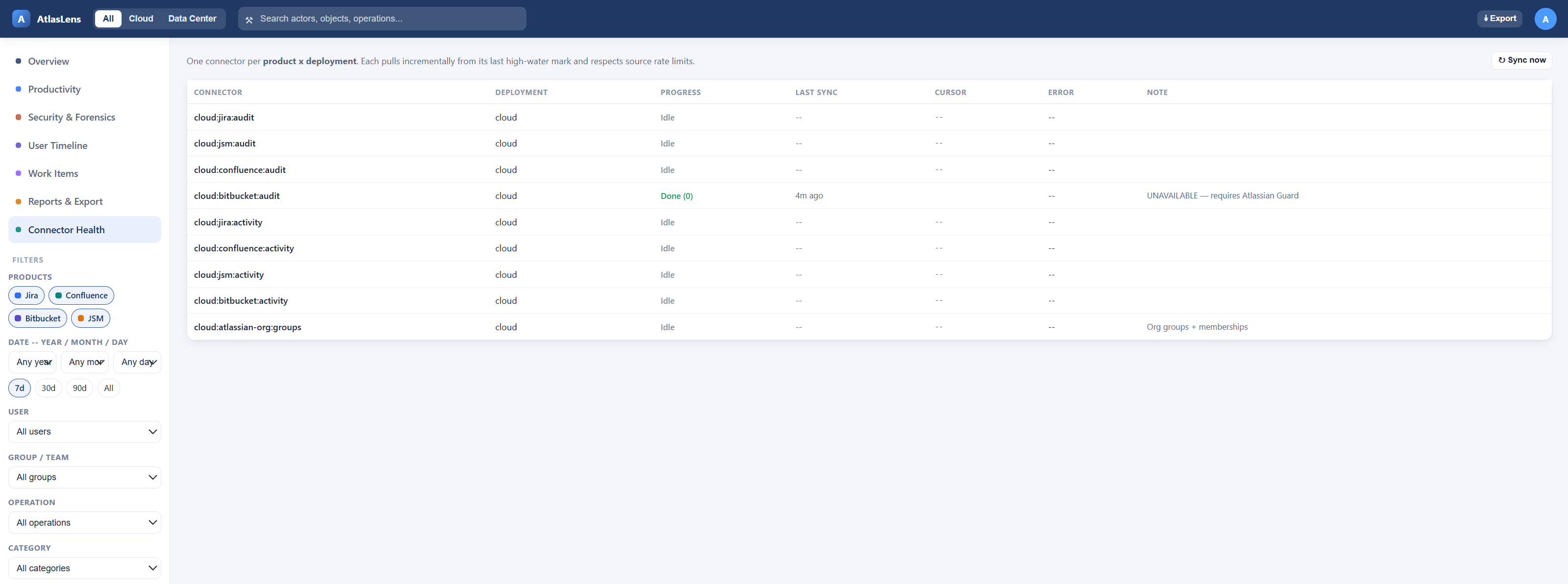
While a sync runs, the page polls and shows:
- an overall in progress banner with how many connectors are done,
- a per-connector progress badge —
queued→running→done(with a count) /error/cancelled, - a last sync column that stays current as each connector completes.
Connector health & watermarks
Each (deployment, product, pipeline) keeps a sync_state row with its cursor (high-water
mark), last_success_at, and last_error. On success the cursor advances and the error
clears; on failure the error is recorded and the cursor is not advanced, so the next run
retries the same window. A failing connector never blocks the others.
Retention
A MongoDB TTL index on occurred_at expires events after one year. This enforces the
retention policy automatically and serves as data minimisation — no manual pruning required.
Backups
Back up the MongoDB volume (mongodump or volume snapshots) on your own schedule. The store is
append-only apart from TTL expiry, so point-in-time backups are straightforward.
Triggering a sync without the UI
You can run a full sync (or just group sync) from inside the backend container/pod — useful on a fresh deployment before the first scheduled cycle: